1Why Vocla
Animate photos with AI without distorting the product
The camera and light move around your product with the latest video models while its shape, label and text stay the same, because your image is the first frame of every scene.
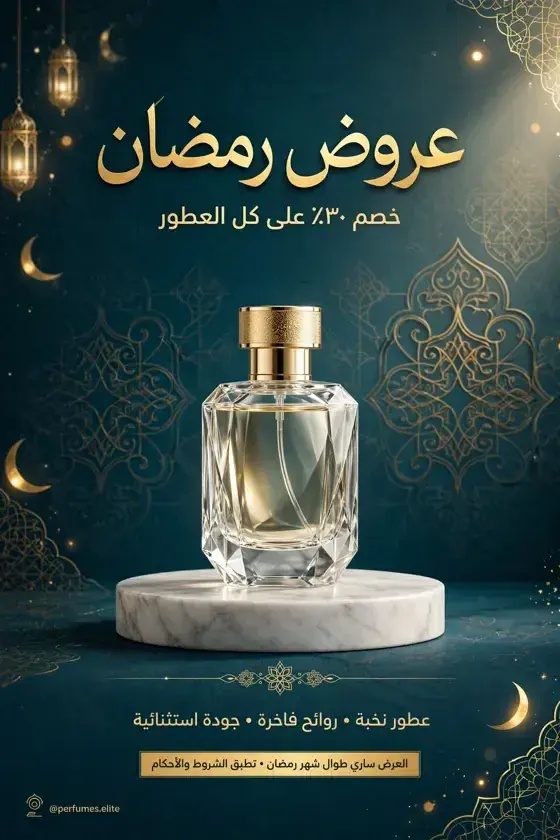
Image to videoNew
Press “Make it a video” on any image: Vocla writes the ad in your dialect, voices it in Arabic and brings the scene to life without changing your product.

In short
Turning an image into a video in Vocla takes one click on “Make it a video”: choose a video ad, where Vocla writes the script, voices it in Arabic and animates your photos scene by scene, or put the image into your own clip with AI video edit. The video ad is included from the Starter plan, and AI video edit from Professional.
How it works
From one image to an ad with an Arabic voice
A product shot from the studio, or a photo from your phone.
Pick a video ad with an Arabic voice, or put it into a clip.
Download a 9:16 video for Reels and TikTok or 16:9 for YouTube.
The camera and light move around your product with the latest video models while its shape, label and text stay the same, because your image is the first frame of every scene.
Vocla reads your product photo and writes a short ad in your dialect, Saudi, Emirati, Egyptian or Kuwaiti, then voices it in Arabic and adds captions and music.

Choose “Put it in a video” and the image moves to AI video edit as a reference photo: upload your clip and say where it goes, like “put the box on the table”.
Ideas
Every picture here was made in the Vocla studio. Tap one to open the studio with its prompt ready, then make it yours.
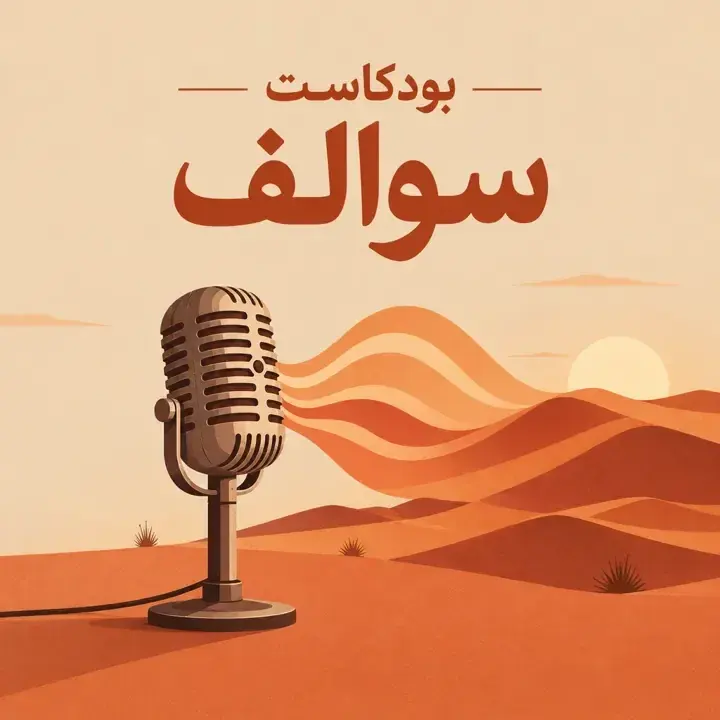
Product photoA luxury product photo of an open box of dates with a gold ribbon on emerald velvet, a brass dallah beside it, warm studio lightUse this ideaRamadan sale posterAn elegant Ramadan sale poster for a perfume shop, a crystal bottle on a marble pedestal, teal and gold, with the Arabic headline «عروض رمضان» and below it «خصم ٣٠٪ على كل العطور»Use this ideaPerfume adA luxury perfume bottle on golden beach sand at sunset, calm waves behind it, cinematic lightUse this ideaPodcast coverA minimal podcast cover: a classic microphone whose sound waves turn into sand dunes at sunset, with the elegant Arabic title «بودكاست سوالف»Use this ideaFrom image to video
Press “Make it a video” on any image: Vocla turns it into an ad with a real Arabic voice, or puts it into your own clip with AI video edit.
Video ad from the Starter plan, AI video edit from Professional
Plans
The image studio starts with Starter, with more on each step up.
The image studio: images from a description, background removal, enhancement up to 2K and video ads from your images
Start creatingPress “Make it a video” on any image in the Vocla studio and choose a video ad with an Arabic voice, or put it into your clip.
Not on the Free plan. A video ad from an image is included from the Starter plan and AI video edit from Professional; both use your plan's credits by video length.
No, the image is the first frame of every scene, so the product and its label stay the same.
9:16 for Reels, TikTok and stories, 16:9 for YouTube, and 1:1 for posts.
Yes, pick the dialect and voice from Vocla's Arabic voice library.
Explore the studio
Image to video
Describe it in Arabic or English and see it in seconds. Credits are charged only for images that succeed.